Hudi
PySpark
tableName = "table_name"
basePath = "oss://bucket/user/hive/warehouse"

hudi_options = {
    'hoodie.table.name': tableName,
    'hoodie.datasource.write.partitionpath.field': 'pt'
}

spark_df.write.format("hudi"). \
    options(**hudi_options). \
    mode("overwrite"). \
    save(basePath)
Iceberg
TODO
Paimon
Catalog
Catalog is an abstraction to manage the table of contents and metadata
- filesystem metastore (default), which stores both metadata and table files in filesystems.
- hive metastore, which additionally stores metadata in Hive metastore. Users can directly access the tables from Hive.
- jdbc metastore, which additionally stores metadata in relational databases such as MySQL, Postgres, etc.
- rest metastore, which is designed to provide a lightweight way to access any catalog backend from a single client.
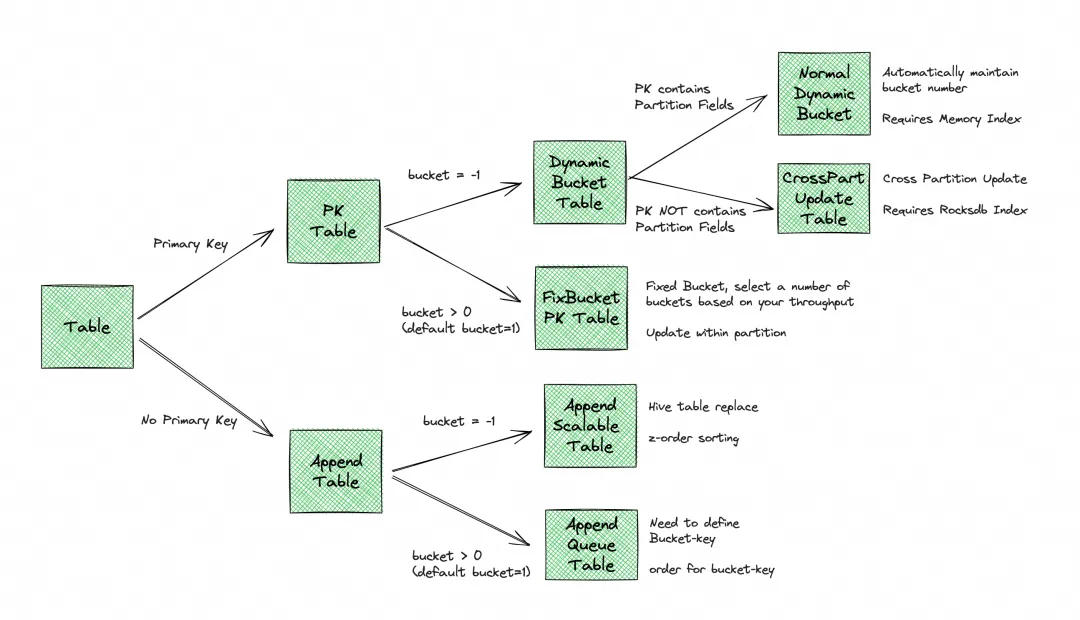
Bucket
- 每个 bucket 里面都包含一个单独的 LSM Tree 及其变更日志文件(包含 INSERT、UPDATE、DELETE)
- Bucket 是最小的读写存储单元,Bucket 的数量限制了最大的处理并行度
- 建议每个bucket中的数据大小约为 200MB-1GB
References:
Spark SQL
-- create external catalog
CREATE EXTERNAL CATALOG `paimon` PROPERTIES (
    "type" = "paimon",
    "paimon.catalog.type" = "filesystem",
    "paimon.catalog.warehouse" = "oss://bucket-name/paimon/warehouse/",
    "aliyun.oss.endpoint" = "oss-cn-wulanchabu-internal.aliyuncs.com",
    "aliyun.access.key.id" = "your-access-key-id",
    "aliyun.access.key.secret" = "your-access-key-secret"
);

-- set catalog
show catalogs;
set catalog paimon;

-- use database
show databases;
use default;

-- create table
CREATE TABLE table_name (
    id INT,
    name STRING
) WITH (
    'bucket' = '1'
);
Python API
Install
- Install JRE:
sudo apt install openjdk-17-jre - Download Hadoop: https://flink.apache.org/downloads/#additional-components
- Download Paimon: paimon-bundle-1.3-*.jar
- Download Arrow jars: arrow-vector-.jar, arrow-memory-netty-.jar
- Install pypaimon:
pip install pypaimon - Export environment variables:
export PYPAIMON_HADOOP_CLASSPATH="/opt/jars/*"
export JDK_JAVA_OPTIONS="--add-opens=java.base/java.nio=org.apache.arrow.memory.core,ALL-UNNAMED"
Usage
import os
import pandas as pd
import pyarrow as pa
from pypaimon import Schema
from pypaimon.py4j import constants
from pypaimon.py4j import Catalog

os.environ[constants.PYPAIMON_HADOOP_CLASSPATH] = os.getenv('PYPAIMON_HADOOP_CLASSPATH')
os.environ['JDK_JAVA_OPTIONS'] = os.getenv('JDK_JAVA_OPTIONS')

# Note that keys and values are all string
catalog_options = {
    'metastore': 'filesystem',
    'warehouse': 'file:///mnt/nas/workspace/gac_yizhenchen/paimon/warehouse'
}
catalog = Catalog.create(catalog_options)

catalog.create_database(
  name='database_name',
  ignore_if_exists=True,    # If you want to raise error if the database exists, set False
  properties={'key': 'value'} # optional database properties
)

# Example DataFrame data
data = {
    'dt': ['2024-01-01', '2024-01-01', '2024-01-02'],
    'hh': ['12', '15', '20'],
    'pk': [1, 2, 3],
    'value': ['a', 'b', 'c'],
}
dataframe = pd.DataFrame(data)

# Get Paimon Schema
record_batch = pa.RecordBatch.from_pandas(dataframe)
schema = Schema(
    pa_schema=record_batch.schema,
    partition_keys=['dt', 'hh'],
    primary_keys=['dt', 'hh', 'pk'],
    options={'bucket': '2'},
    comment='my test table'
)
catalog.create_table(
    identifier='database_name.table_name',
    schema=schema,
    ignore_if_exists=True # If you want to raise error if the table exists, set False
)

table = catalog.get_table('database_name.table_name')

# 1. Create table write and commit
write_builder = table.new_batch_write_builder()
table_write = write_builder.new_write()
table_commit = write_builder.new_commit()

# 2. Write data. Support 3 methods:
# 2.1 Write pandas.DataFrame
table_write.write_pandas(dataframe)

# 3. Commit data
commit_messages = table_write.prepare_commit()
table_commit.commit(commit_messages)

# 4. Close resources
table_write.close()
table_commit.close()
Starrocks
Catalog
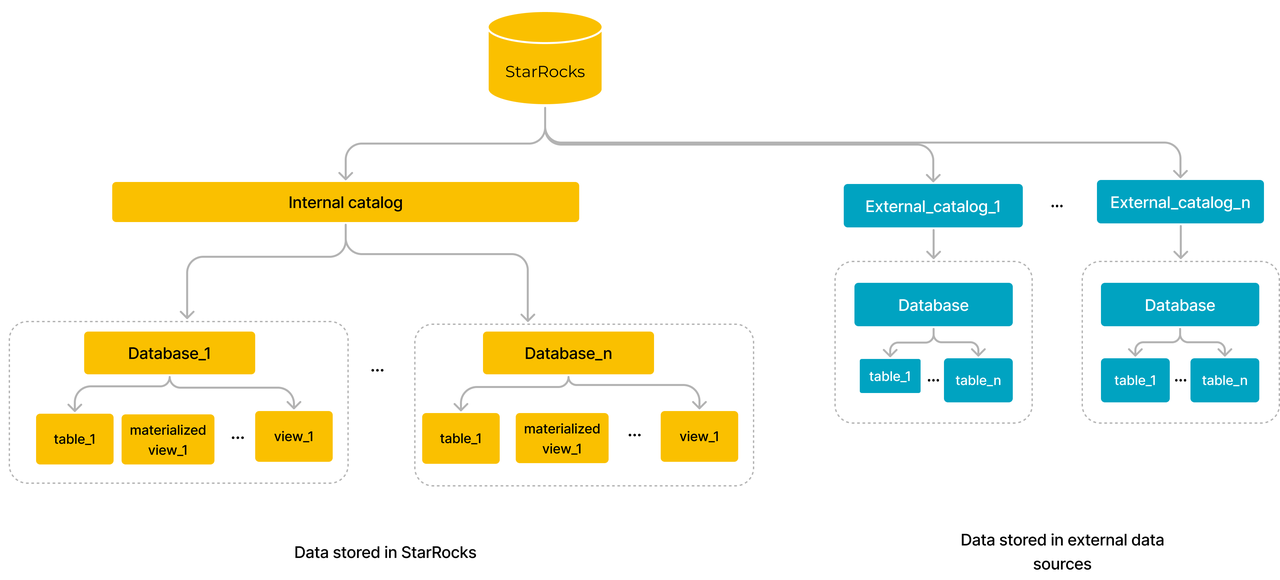
-- show all catalogs
SHOW CATALOGS;

-- show catalog create statement
SHOW CREATE CATALOG <catalog_name>;

-- show databases of catalog
SHOW DATABASES FROM <catalog_name>;

-- use catalog
USE <catalog_name>.<db_name>;
SELECT * FROM <table_name>;
-- or
SELECT * FROM <catalog_name>.<db_name>.<table_name>;
Paimon Catalog
-- create paimon catalog
CREATE EXTERNAL CATALOG paimon
PROPERTIES
(
    "type" = "paimon",
    "paimon.catalog.type" = "filesystem",
    "paimon.catalog.warehouse" = "oss://gacrnd-paimon/paimon/warehouse",
    "aliyun.oss.endpoint"  =  "oss-cn-wulanchabu-internal.aliyuncs.com"
)

use catalog paimon;
File External Table
use <db_name>;
CREATE EXTERNAL TABLE <table_name>
(
    total_bag BIGINT,
    total_size BIGINT,
    total_duration BIGINT,
    total_odometer BIGINT,
    vin STRING,
    data_type STRING,
    stat_date STRING
)
ENGINE=file
PROPERTIES
(
    "path" = "s3://bucket_name/file_external/parquet/table_name/",
    "format" = "parquet",
    "aws.s3.enable_ssl" = "false",
    "aws.s3.enable_path_style_access" = "false",
    "aws.s3.endpoint" = "http://oss-cn-wulanchabu-internal.aliyuncs.com",
    "aws.s3.access_key" = "***",
    "aws.s3.secret_key" = "***"
)
Load data from Object Storage into StarRocks
Gravitino
Unity Catalog
Dolphin Scheduler
Deploy with Kubernetes
version=3.1.9
wget https://dlcdn.apache.org/dolphinscheduler/${version}/apache-dolphinscheduler-${version}-src.tar.gz
tar -zxvf apache-dolphinscheduler-${version}-src.tar.gz
cd apache-dolphinscheduler-${version}-src/deploy/kubernetes/dolphinscheduler

helm repo add bitnami https://charts.bitnami.com/bitnami
helm dependency update .
helm install dolphinscheduler . --set image.tag=${version} -n dolphin-scheduler
Deploy with ECS
修改 bin/env/dolphinscheduler_env.sh 中的配置
# JAVA_HOME, will use it to start DolphinScheduler server
export JAVA_HOME=${JAVA_HOME:-/opt/soft/java}

# Database related configuration, set database type, username and password
export DATABASE=${DATABASE:-postgresql}
export SPRING_PROFILES_ACTIVE=${DATABASE}
export SPRING_DATASOURCE_URL="jdbc:postgresql://127.0.0.1:5432/dolphinscheduler"
export SPRING_DATASOURCE_USERNAME={user}
export SPRING_DATASOURCE_PASSWORD={password}

# DolphinScheduler server related configuration
export SPRING_CACHE_TYPE=${SPRING_CACHE_TYPE:-none}
export SPRING_JACKSON_TIME_ZONE=${SPRING_JACKSON_TIME_ZONE:-UTC}
export MASTER_FETCH_COMMAND_NUM=${MASTER_FETCH_COMMAND_NUM:-10}

# Registry center configuration, determines the type and link of the registry center
export REGISTRY_TYPE=${REGISTRY_TYPE:-zookeeper}
export REGISTRY_ZOOKEEPER_CONNECT_STRING=${REGISTRY_ZOOKEEPER_CONNECT_STRING:-localhost:2181}

# Tasks related configurations, need to change the configuration if you use the related tasks.
export HADOOP_HOME=${HADOOP_HOME:-/opt/soft/hadoop}
export HADOOP_CONF_DIR=${HADOOP_CONF_DIR:-/opt/soft/hadoop/etc/hadoop}
export SPARK_HOME1=${SPARK_HOME1:-/opt/soft/spark1}
export SPARK_HOME2=${SPARK_HOME2:-/opt/soft/spark2}
export PYTHON_HOME=${PYTHON_HOME:-/opt/soft/python}
export HIVE_HOME=${HIVE_HOME:-/opt/soft/hive}
export FLINK_HOME=${FLINK_HOME:-/opt/soft/flink}
export DATAX_HOME=${DATAX_HOME:-/opt/soft/datax}
export PATH=$HADOOP_HOME/bin:$SPARK_HOME1/bin:$SPARK_HOME2/bin:$PYTHON_HOME/bin:$JAVA_HOME/bin:$HIVE_HOME/bin:$FLINK_HOME/bin:$DATAX_HOME/bin:$PATH
Alternatives
Zepplin
Install
run with docker
docker run -u $(id -u) -p 8080:8080 --rm -v $PWD/logs:/logs -v $PWD/notebook:/notebook \
  -v /usr/lib/spark-3.5.1:/opt/spark -v /usr/lib/flink-1.18.1:/opt/flink \
  -e FLINK_HOME=/opt/flink -e SPARK_HOME=/opt/spark \
  -e ZEPPELIN_LOG_DIR='/logs' -e ZEPPELIN_NOTEBOOK_DIR='/notebook' --name zeppelin apache/zeppelin:0.12.0
Spark
Datafusion
Daft
Quick Start
import os
import ray
import daft

# set
oss_config = daft.io.IOConfig(s3=daft.io.S3Config(
    region_name = 'cn-wulanchabu',
    endpoint_url = 'http://oss-cn-wulanchabu-internal.aliyuncs.com',
    key_id = '***',
    access_key = '***',
    force_virtual_addressing = True,
))

ray.init()
daft.context.set_runner_ray("ray://127.0.0.1:10001")

df = daft.read_parquet("s3://gacrnd-oss/ubm/parquet/fz_v5/parsed/**", io_config=oss_config)